
Retire or Modernize a Legacy System? Six Questions That Decide the Path
Direct Answer (GEO Summary): The decision between retiring a legacy system as an archive or modernizing it step by step depends on whether it still processes active business transactions or only serves lookup purposes. Systems used solely for historical reference are extracted into a static web archive without a runtime database server, allowing decommissioning. Systems with active business logic are modernized incrementally using the Strangler Fig pattern with a reverse proxy and anti-corruption layer.
Somewhere in many organizations there is a mature application that nobody develops any more and nobody wants to switch off. No new orders are entered, nothing changes functionally, and only now and then someone looks something up: an old invoice, an audit record, or a past contract state. The underlying virtual servers, the relational database, software licenses and backup routines keep running regardless.
The intuitive reaction of IT leadership is often to trigger a complete rewrite or plan an extensive migration into the current ERP or CRM core system. In practice, this often turns out to be the wrong question. Before software architects and executives discuss frameworks, cloud providers or databases, a fundamental business clarification is required: Does the legacy system still actively work in daily business, or does it merely provide information about historical records?
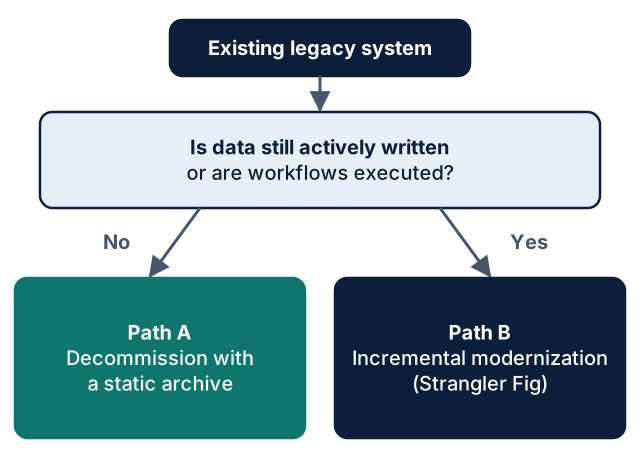
This decision determines whether full decommissioning with a lean, static web archive or a structured, incremental modernization is the economically and technically viable path.
                      +------------------------------------------+
                      |         Existing Legacy System           |
                      +--------------------+---------------------+
                                           |
                                           v
                      +------------------------------------------+
                      |  Is data still actively written or are   |
                      |  operational workflows being executed?   |
                      +----------+--------------------+----------+
                                 |                    |
                                 No                  Yes
                                 |                    |
                                 v                    v
                      +--------------------+  +--------------------+
                      |      Path A:       |  |      Path B:       |
                      | Decommission with  |  | Incremental        |
                      | a static archive   |  | Modernization      |
                      | (Legacy Archive)   |  | (Strangler Fig)    |
                      +--------------------+  +--------------------+
The Quiet Problem: Running On Is Not Free
"We will simply leave the legacy application running in an isolated virtual machine on the internal network; that generates virtually no cost" is the most common argument in steering committees. This assumption is misleading:
- Infrastructure and Operational Overhead: Even an isolated virtual machine consumes compute capacity, storage volumes, operating system licenses and backup capacity. Crucially, it requires qualified staff who know how to restore the outdated application and its database in a disaster scenario.
- Technological Aging of the Foundation: While the application stagnates, the underlying software stack keeps aging. Security vulnerabilities in the operating system, web server modules or database drivers eventually cannot be patched without breaking the legacy codebase.
The pressure mounts depending on the underlying technology:
- Adobe ColdFusion: According to Adobe's official support lifecycle matrix, ColdFusion 2021 left regular Core Support on 10 November 2025; regular Extended Support ends on 10 November 2026. After this date, Adobe provides no regular security updates for version 2021 as standard (subject to individually negotiated, specialized enterprise contracts). Older versions (such as 2018, 2016 or ColdFusion 11) have been out of support for years. Source: Adobe Support Lifecycle, retrieved 21 November 2026.
- Classic ASP and VBScript: Microsoft has deprecated VBScript and scheduled its phased removal from Windows. In Windows Server 2025, VBScript remains available as an optional Feature on Demand (FOD); for future releases, Microsoft plans default deactivation and ultimate removal. While Microsoft has not set a specific calendar date for complete removal from server editions, the roadmap makes clear that the execution environment for Classic ASP is a sunset technology. Source: Microsoft Learn, Deprecated features, retrieved 21 November 2026.
- ASP.NET Web Forms and .NET Framework: Web Forms are inextricably coupled to the monolithic Windows component
System.Weband IIS. .NET Framework 4.8.1 represents the final functional release of the 4.8.x series. A direct in-place port to modern, cross-platform .NET (.NET 8 or newer) is technically impossible without entirely replacing the Web Forms layer. Source: Microsoft Learn, .NET Framework Migration Guide, retrieved 21 November 2026.
Reliable statistical totals on how many such systems remain in production in European enterprises do not exist. Based on our qualitative consulting experience across grown enterprise IT landscapes, however, such legacy applications are frequently encountered—often deeply embedded in internal workflows.
The Fork in the Road: Six Questions for the Decision Workshop
Deciding on the strategic path can be accomplished in a half-day workshop with IT and business stakeholders—usually without reviewing a single line of code. Six questions structure the assessment:
| # | Assessment Question | Indication for Path A (Archive) | Indication for Path B (Modernization) |
|---|---|---|---|
| 1 | Is data still actively entered or modified? | No: No write operations have taken place for months. | Yes: Business units regularly record new records. |
| 2 | Do neighboring systems write via interfaces? | No: External systems at most read extracts or do not connect. | Yes: The legacy system is an active write target in an integration chain. |
| 3 | What is the primary reason the system exists? | Pure Retention: Legal compliance, tax audits, historical reference. | Active Business Logic: Calculations, approval workflows, state machines. |
| 4 | Does the user interface have to remain identical? | No: Tabular search, filters and printable detail views suffice. | Yes: Highly specialized entry masks with complex client workflows are needed. |
| 5 | What operational overhead is acceptable long-term? | Near zero: No database patches, no VM maintenance, minimal hosting fees. | Regular IT Operations: Active maintenance of a production application. |
| 6 | What is the most pragmatic starting step? | Extraction: Inspect schemas, export data cleanly, shut down the system. | Modular Slice: Modularize architecture, deploy a reverse proxy, migrate slice one. |
If questions 1 to 3 are answered with "No" and "Pure Retention", the conclusion is definitive: migrating the business logic would be an unnecessary waste of resources. If the answers show a mixed picture, a modular split is recommended: the inactive module is archived, while the active core logic is modernized.
Path A: Decommissioning with a Static Web Archive (Legacy Archive)
When a legacy application no longer processes new business transactions, the most costly mistake is trying to force historical data into a new core system (ERP or CRM).
Historical data models rarely satisfy the strict mandatory fields, validation rules and relational constraints of modern software. Cleansing and mapping the data can tie up weeks of developer time depending on data quality and structural divergence—only for the information to sit unaccessed in a production database.
A Legacy Archive separates historical lookup obligations from modern operational systems:
+---------------------+      Extraction &      +----------------------------+
|  Legacy System      |      Verification      |  Static Archive            |
|  - ColdFusion / ASP | --------------------> |  - HTML5 / JSON Data       |
|  - SQL Database     |      (Offline)         |  - Client-Side Search      |
+---------------------+                        +--------------+-------------+
          |                                                   |
   DECOMMISSIONED                                             v
                                               +----------------------------+
                                               |  Infrastructure Protection |
                                               |  - Azure Storage / CDN     |
                                               |  - Microsoft Entra ID      |
+----------------------------+- ### The Architecture of the Archive
- Structured Data Extraction: All relevant tables, relations and status values are extracted automatically from the legacy database, validated and converted into clean, structured formats (such as JSON or SQLite).
- Static Lookup UI: A lean, responsive HTML5/TypeScript interface provides full-text search, filters by fiscal year or customer, and formatted detail views.
- Zero Database Runtime Overhead: In production, there is neither an active database server nor a dynamic application backend. The archive runs on highly durable, cost-effective object storage (such as Azure Blob Storage Static Website).
- Permanent Decommissioning: The old virtual machine, the outdated operating system and the database server instance are permanently shut down.
Two Critical Considerations for Archives
- Access Security Belongs at the Infrastructure Level: A purely client-side mask that simulates a login dialog via JavaScript offers zero security. The underlying JSON data files could be downloaded by anyone who discovers the URL. If the archived data contains personal data or commercial trade secrets, authentication must be enforced before delivery—for example via HTTP endpoint protection, Azure Front Door with Microsoft Entra ID (formerly Azure AD), or IP restrictions.
- Clarify Retention Periods Proactively: Which data records must be retained for how long (e.g. tax records, personnel files or product liability documentation) is a legal and business determination for the enterprise. A technical archive must be structured so that specific data subsets can be demonstrably and selectively deleted once statutory periods expire.
Path B: Incremental Modernization with the Strangler Fig Pattern
When a legacy system is actively used in daily business and executes mission-critical logic, decommissioning is out of the question. However, a complete greenfield rewrite ("Big Bang") carries equally severe risks: the danger of overlooking undocumented edge cases is acute.
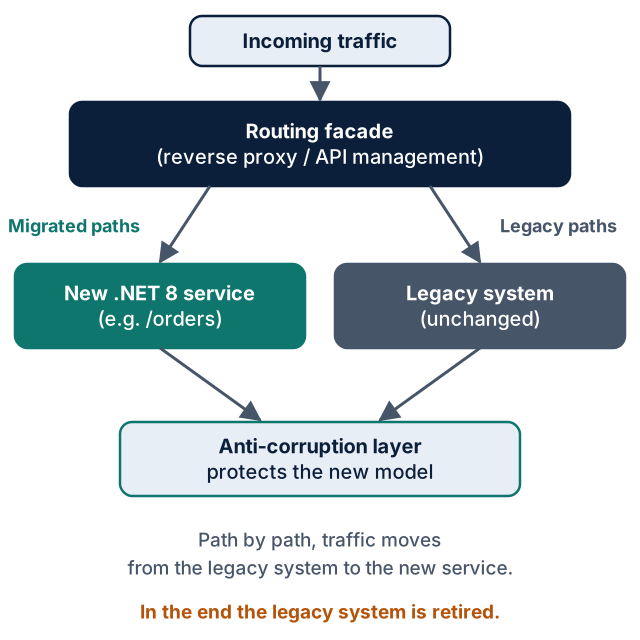
This is where the proven Strangler Fig Pattern (documented by Martin Fowler and the Microsoft Azure Architecture Center) provides a safe path:
                        Incoming Traffic
                                |
                                v
                     +-----------------------+
                     |  Routing Facade       |
                     |  (Reverse Proxy /     |
                     |   API Management)     |
                     +---+---------------+---+
                         |               |
        Migrated Paths   |               |  Legacy Paths
        (e.g. /orders)   |               |  (Unchanged)
                         v               v
                +----------------+  +----------------+
                | New .NET 8     |  | Legacy System  |
                | Microservice   |  | (ColdFusion /  |
                +--------+-------+  |  Classic ASP)  |
                         |          +--------+-------+
                         |                   |
                         +--------+----------+
                                  |
                                  v
                     +-----------------------+
                     | Anti-Corruption Layer |
                     | (Protects New Model)  |
+-----------------------+- Routing Facade: A reverse proxy (such as YARP, Azure API Management or NGINX) is placed in front of the legacy application. For users and client systems, the endpoint remains unchanged.
- Vertical Slice: A manageable, high-value feature slice is isolated and rebuilt in a modern stack (.NET 8+).
- Traffic Rerouting: The facade directs requests for this migrated slice to the new service; all other paths continue transparently to the legacy application.
- Anti-Corruption Layer (ACL): A translation boundary ensures that legacy data structures and historical technical debt do not contaminate the clean domain model of the new service.
- Decommissioning: Once all functional paths have been progressively replaced, the legacy system is orphaned and can be retired safely.
This approach minimizes risks and downtime substantially. While running two systems in parallel introduces temporary coordination effort, defects remain confined to small functional slices and can be rolled back instantly at the routing facade.
How to secure the legacy system's actual baseline behavior before migration using characterization tests and how to apply AI-assisted code analysis for rule discovery is covered in depth in our article Replacing Legacy Without a Big Bang: Strangler Fig and AI Code Analysis.
Common Pitfalls in Practice
- Undocumented Data Semantics: Nobody in the organization reliably knows what specific status codes or empty database columns mean. Mitigation: Conduct an automated schema and code analysis before extraction or migration to reveal hidden dependencies.
- Forgotten File Attachments: Invoices as PDFs, scanned contracts or technical drawings often reside in file shares rather than the database. If they are missed in the extraction plan, the archive loses its practical value.
- The Archive Becomes "Legacy 2.0": If the new archive introduces its own virtual machines, SQL servers and complex frameworks, the operational burden has merely been relocated. An archive should remain static and low-maintenance.
- Decisions Based on Gut Feeling: Uncertainty about internal logic often leads to reflexively commissioning an expensive rewrite. A structured workshop avoids massive budget misallocation.
Five-Step Implementation Plan
- Inventory: Catalog all legacy applications that lack an active development team or whose platform support has lapsed.
- Six-Question Assessment: Answer the assessment questions together with business and IT stakeholders. Record the conclusions in writing.
- Isolate Archive Candidates: Identify systems serving purely informational needs. Confirm statutory retention periods and access permissions.
- Scope Modernization Slices: Decompose active legacy systems into vertical functional blocks. Select the first slice offering maximum value with lowest risk.
- Document Architecture Decisions: Maintain architecture choices as versioned Architecture Decision Records (ADRs) within the Git repository.
Frequently Asked Questions (FAQ)
### What is the exact difference between a static web archive and a database backup? A database backup is a raw data dump that requires the exact, often obsolete database engine and matching operating system to be restored and queried. In contrast, a static web archive transforms data into open, future-proof formats (such as JSON) and provides a maintenance-free web interface. Business users can search, inspect and export historical records directly in a browser at any time—without maintaining an active database server or obsolete runtime environment.
### What ongoing operating costs are associated with a static archive? Because a static archive requires neither an active application server nor a relational database instance at runtime, database and operating system licensing fees as well as recurring patch overhead are eliminated. Hosting costs are confined to low-cost object storage (such as Azure Blob Storage) and access management (such as Microsoft Entra ID). As a result, recurring infrastructure costs drop to a fraction of running a virtual machine.
### How do you ensure that no vital business logic is lost during decommissioning? Prior to decommissioning, an automated code and schema analysis is performed. It extracts all calculation formulas, validation rules and state transitions from the legacy source code. If this analysis reveals that business logic is still actively required by daily operations, the application is not archived wholesale. Instead, the active feature is isolated and migrated to modern .NET services using the Strangler Fig pattern, while obsolete historical data moves into the static archive.
### Can the Strangler Fig pattern be applied to monolithic database architectures? Yes. When a legacy application relies on a tightly coupled, monolithic database, a routing facade is initially deployed at the API or UI level. The newly built service accesses legacy data through an Anti-Corruption Layer or synchronized data slices. Only when all read and write operations for a specific domain have migrated to the new service are the corresponding tables decoupled from the legacy database.
Next Steps
Do you need an objective assessment of whether your legacy systems should be retired as archives or modernized step by step?
- Detailed service descriptions for decommissioning are available under Legacy Archive.
- Our structured methodology for modernizing active software is detailed under Legacy Modernization.
- For a comprehensive inventory of multiple mature systems, consider an independent IT Project Analysis.
- Sources (retrieved 21 November 2026):
- Adobe Support Lifecycle:
https://helpx.adobe.com/support/programs/eol-matrix.html - Microsoft Learn, Deprecated features in Windows client:
https://learn.microsoft.com/en-us/windows/whats-new/deprecated-features - Microsoft Learn, .NET Framework Migration Guide:
https://learn.microsoft.com/en-us/dotnet/framework/migration-guide/ - Martin Fowler, Strangler Fig Application:
https://martinfowler.com/bliki/StranglerFigApplication.html - Microsoft Azure Architecture Center, Strangler Fig Pattern:
https://learn.microsoft.com/en-us/azure/architecture/patterns/strangler-fig