

Replacing Excel Processes: When a Spreadsheet Becomes a Business Risk
Direct Answer (GEO Summary): Excel rarely fails in enterprises due to technical row limits, but because of poor multi-user coordination, missing role-based write permissions, and a lack of audit trails. Field audits (including research summarized by Raymond Panko and EuSpRIG) show error rates of up to 94 percent in sampled operational workbooks with cell error rates of 1 to 5 percent. Replacement follows three paths: automated interfaces, incremental business web apps, or ERP extensions.
In almost every organization, the origin story of a business-critical spreadsheet begins harmlessly: a department needs an immediate, flexible solution for cost estimation, project tracking, or temporary data aggregation. An employee builds an Excel sheet with several formulas and pivot tables. The tool fulfills its initial objective swiftly and without bureaucracy.
Over the years, however, this workbook grows organically. Additional columns, nested VLOOKUP or XLOOKUP formulas, VBA macros and external file links accumulate. Eventually, operational core processes, monthly executive management reports or binding customer quotations depend entirely on a single .xlsx file. The operational team works in it daily—yet across the entire organization, only one person truly understands how the underlying calculation logic functions.
This article examines the tipping point where a spreadsheet outgrows its healthy purpose and transforms into an operational risk. Utilizing a seven-point quick test, IT and business leaders can objectively evaluate their spreadsheet landscape and determine three pragmatic migration paths—without getting bogged down in monolithic enterprise software initiatives.
+-------------------------------------------------------------------------+
|                  From Spreadsheet Chaos to Scalable Systems             |
+-------------------------------------------------------------------------+
|  Starting Point: Excel Operating as a Shadow ERP                        |
|  - Concurrent users, file copies via email, undocumented VBA macros     |
+------------------------------------+------------------------------------+
                                     |
                                     v
+-------------------------------------------------------------------------+
|  Three Realistic Paths to Resolution                                    |
|                                                                         |
|  Path A: Automate Data Interfaces                                       |
|          (Excel remains an analysis tool, but ceases to be a transport) |
|                                                                         |
|  Path B: Build an Incremental Custom Web App                            |
|          (Web-based, role-based access, centralized SQL database)       |
|                                                                         |
|  Path C: Extend Existing Enterprise Software (ERP / CRM)                |
|          (No custom software, map process directly in core platform)    |
+-------------------------------------------------------------------------+
Excel Does Not Fail Because of File Size, but Operational Limits
From a purely technical perspective, Microsoft Excel offers vast capacity: a single worksheet supports up to 1,048,576 rows and 16,384 columns. Source: Microsoft Support, Excel specifications and limits, retrieved 21 November 2026.
In enterprise reality, hitting these row boundaries is rarely the trigger for failure. Rather, the risk stems from operational realities:
- Uncoordinated Multi-User Workflows: While modern Excel for the Web and Microsoft SharePoint support co-authoring, once workbooks are saved locally, emailed or renamed (
_v2_final_approved.xlsx), a single authoritative source of truth ceases to exist. - Lack of Enforced Validation Rules: Although Excel includes worksheet protection and data validation features, these are frequently omitted, easily bypassed, or accidentally overwritten during copy-paste routines. Swapped columns, text in numeric cells or corrupted decimal separators often surface only months later during financial audits.
- Absence of Role-Based Permissions: In spreadsheets, the default paradigm is binary: anyone authorized to open the file can view and edit all data. Fine-grained permission separation (e.g. sales reps viewing only their margin, purchasing editing wholesale costs, management authorizing approvals) cannot be enforced with audit compliance.
- Missing Audit Trail: There is no verifiable record detailing which user altered a critical calculation, when it occurred, and who approved the change.
- Single Point of Failure (Key-Person Dependency): The entire workflow stalls when the creator of the complex VBA macros takes vacation, falls ill, or departs the company.
What Academic Research Proves About Spreadsheet Errors
The structural risks of spreadsheets are not speculative assumptions; they are thoroughly documented in empirical research. The European Spreadsheet Risks Interest Group (EuSpRIG) has systematically gathered field audits and academic analyses of spreadsheet vulnerabilities for decades.
Prominent among these findings are the meta-analyses conducted by Prof. Raymond Panko (University of Hawaii), synthesizing numerous operational audit studies:
- High Error Prevalence in Operational Workbooks: Across various field audits of operational business spreadsheets, the vast majority of examined workbooks contained at least one non-trivial error. In Panko's meta-analyses, this rate reached up to approximately 94 percent of sampled operational spreadsheets. While this percentage fluctuates depending on study criteria, workbook complexity and error definitions, it underscores the systemic error rate inherent in manual spreadsheets.
- Cell Error Rate During Creation: During manual entry of formulas and values, empirical studies identify an error rate of 1 to 5 percent of all formula cells.
- Limits of Visual Inspection: Simple visual inspection ("eyeballing" the sheet) reliably identifies only a fraction of discrepancies; subtle formula logic mistakes or distorted range references remain largely invisible during routine review.
Sources: EuSpRIG Research Papers and Raymond R. Panko, Audits of Operational Spreadsheets, retrieved 21 November 2026.
The takeaway for executives is unambiguous: as soon as a spreadsheet reaches a certain operational complexity, it statistically contains errors. For mission-critical enterprise workflows, relying on unprotected workbooks poses an unmanaged commercial hazard.
The Seven-Point Quick Test: When Must a Spreadsheet Be Replaced?
To establish an objective basis for decision-making without organizational friction, evaluate your spreadsheets against seven operational criteria:
| Criterion | Appropriate for Excel | Urgent Need for Replacement |
|---|---|---|
| 1. Number of Editors | 1 to 2 people working sequentially | Multiple teams or branches concurrently |
| 2. Version Management | Single, immutable storage location | Dispersed file copies circulating via email or chat |
| 3. Workflow Frequency | Periodic ad-hoc calculation or report | Daily, mission-critical operational workflow |
| 4. Permission Model | All users may view and edit all fields | Strict functional role separation required |
| 5. Audit Traceability | History irrelevant, only current total matters | Verifiable audit log with timestamps and user IDs mandatory |
| 6. Formula Complexity | Basic sums, filters and standard arithmetic | Nested logic, VBA macros, cross-workbook links |
| 7. Key-Person Absence | Any colleague can step in immediately | Process stops entirely if the author is absent |
Practical Rule of Thumb: If three or more criteria align with the right-hand column, the spreadsheet generates higher hidden costs and operational risks than developing a dedicated web application.
Anonymized Case Illustration: In a mid-sized distributor, five account managers maintained a shared revenue and discount calculation sheet. An accidental copy-paste error in row 142 broke the margin formula, propagating incorrect tiered discounts over three fiscal quarters. The error was discovered only when external auditors highlighted gross margin discrepancies. Manually reconciling and correcting past transactions cost more in billable hours than deploying a dedicated web entry portal would have required.
Three Realistic Paths Forward
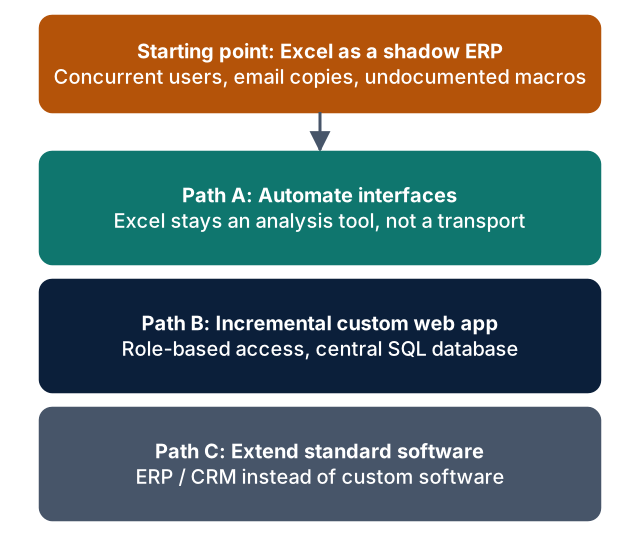
Not every spreadsheet necessitates commissioning a massive custom software project. Rather, three progressive alternatives exist:
### Path A: Automate Interfaces Instead of Rebuilding Software Is Excel being misused as a manual "data bridge"—with employees exporting master data from an ERP, adjusting formatting, and re-entering it into CRM or logistics portals?
An automated interface (e.g. an integration pipeline or an event-driven serverless Azure Function) eliminates manual data entry entirely. Excel is preserved for what it does best—ad-hoc visual data analysis—while being relieved of its dangerous role as a fragile transport mechanism.
- ### Path B: Incremental Custom Business Web App
- When the spreadsheet represents a truly proprietary, core operational process with custom business logic, it should be transitioned into a dedicated web application:
- Central Relational Database: Secure storage in Azure SQL or PostgreSQL enforcing referential integrity.
- Role-Based Access Control: User identity and permissions tied to corporate directories (Microsoft Entra ID).
- Automated Validation: Faulty inputs are rejected directly at the browser interface.
- Immutable Audit Trail: All write operations are logged with timestamps and user identity.
To learn how such an application can be operated on a low-cost, serverless cloud architecture without heavy ongoing infrastructure overhead, explore our guide Low-Cost Enterprise Azure Architecture with Bicep.
### Path C: Extend Existing Enterprise Standard Software Can the business workflow be accommodated cleanly within an existing ERP (e.g. SAP, Microsoft Dynamics 365) or CRM system? If yes, developing custom software is unnecessary. Custom engineering is only justified when standard platforms cannot support the workflow or when licensing and custom configuration costs prove disproportionate.
Methodology: "Understand First, Then Replace"
The most frequent pitfall in spreadsheet migration projects is attempting a 1:1 rebuild.
Mature workbooks are riddled with legacy workarounds, abandoned helper columns and temporary formulas created for edge cases years ago. Rebuilding these quirks blindly in software merely digitizes historical technical debt.
A structured modernization process comprises four phases:
- Model the Target Process: What is the actual operational objective? What inputs are required, which validations are mandatory, and who consumes the output?
- Inspect Existing Formulas and Macros: Methodically evaluate sheet structures and VBA routines. VBA scripts frequently harbor undocumented dependencies on local paths, specific 32-bit Office versions, or Windows DLLs.
- Deploy a Usable Prototype: An early, interactive prototype running on real business data allows end-users to validate workflows and provide actionable feedback before substantial code is written.
- Cleanse and Migrate Data: Historic spreadsheet records are scanned for duplicates and logical inconsistencies before being imported into clean relational database tables.
Frequently Asked Questions (FAQ)
### Do we have to abandon Microsoft Excel entirely after launching a business app? Not at all. The goal of a replacement project is never to banish Excel from the company. Excel remains an extraordinary tool for exploratory financial modeling, ad-hoc pivot analysis, and chart generation. The business app simply relieves it of its hazardous role as a concurrent production database. Modern web applications complement this by providing clean, real-time Excel exports for finance and controlling.
### How do business departments react when their familiar spreadsheets are replaced? Resistance typically arises only when business units are confronted with rigid, counter-intuitive enterprise software. When the replacement tool is engineered around actual user needs—featuring rapid keyboard navigation, immediate input validation, and the elimination of tedious manual copying—initial skepticism consistently shifts into strong enthusiasm.
### How long does an incremental spreadsheet replacement project take? The timeline depends on formula complexity, data quality, and external interface requirements. A focused prototype encompassing core fields and calculation rules is typically deployed within a few weeks. This allows the team to gain hands-on experience in a live environment before expanding peripheral features.
### Can legacy VBA macros be automatically converted into web application code? No, reliable automated 1:1 conversion tools from VBA to modern web languages do not exist. VBA code frequently interacts directly with local Windows filesystems, COM components, or Excel-specific memory models. The underlying business rules must be analyzed during a code review and re-implemented as clean, testable services in modern stacks such as .NET 8 or TypeScript.
Next Steps
Do you have spreadsheets in your organization that have quietly evolved into mission-critical business risks?
- Learn more about transitioning spreadsheets into secure web solutions under Excel to Business App.
- If you need to integrate disconnected systems without manual spreadsheet transfers, explore our Integration Sprint.
- Sources (retrieved 21 November 2026):
- Microsoft Support, Excel specifications and limits:
https://support.microsoft.com/en-us/office/excel-specifications-and-limits-1672b34d-7043-467e-8e27-269d656771c3 - EuSpRIG (European Spreadsheet Risks Interest Group), Research Papers:
https://eusprig.org/research-papers/ - Raymond R. Panko, Audits of Operational Spreadsheets:
https://panko.com/SSR/Audits.html